When non-experts try to brainstorm artificial intelligence solutions, the technology can feel abstract, complex, and difficult to pin down. A helpful way to bridge that gap is to treat AI capabilities not as black-box magic, but as versatile design materials with distinct roles and core actions.
I encounter this challenge firsthand in my work at UNC Charlotte. Whether I am guiding students in my courses to think meaningfully about how to integrate AI into their class projects, or collaborating with my research assistants as we design and build novel solutions for complex security and privacy issues, the same hurdle comes up: Where do we actually start? Without a shared, concrete framework, it is difficult to move past the hype and pinpoint exactly how AI can serve a specific human need or design goal.
Luckily, Nur Yildirim and co-authors (DIS 2023) had done research to address the same issues. Building on their publications, I worked with then-Phd student Sarah Tabassum, and our co-author and fellow Phd student Narges Zare, to create a concise framework for particpatory design research (USEC 2026).
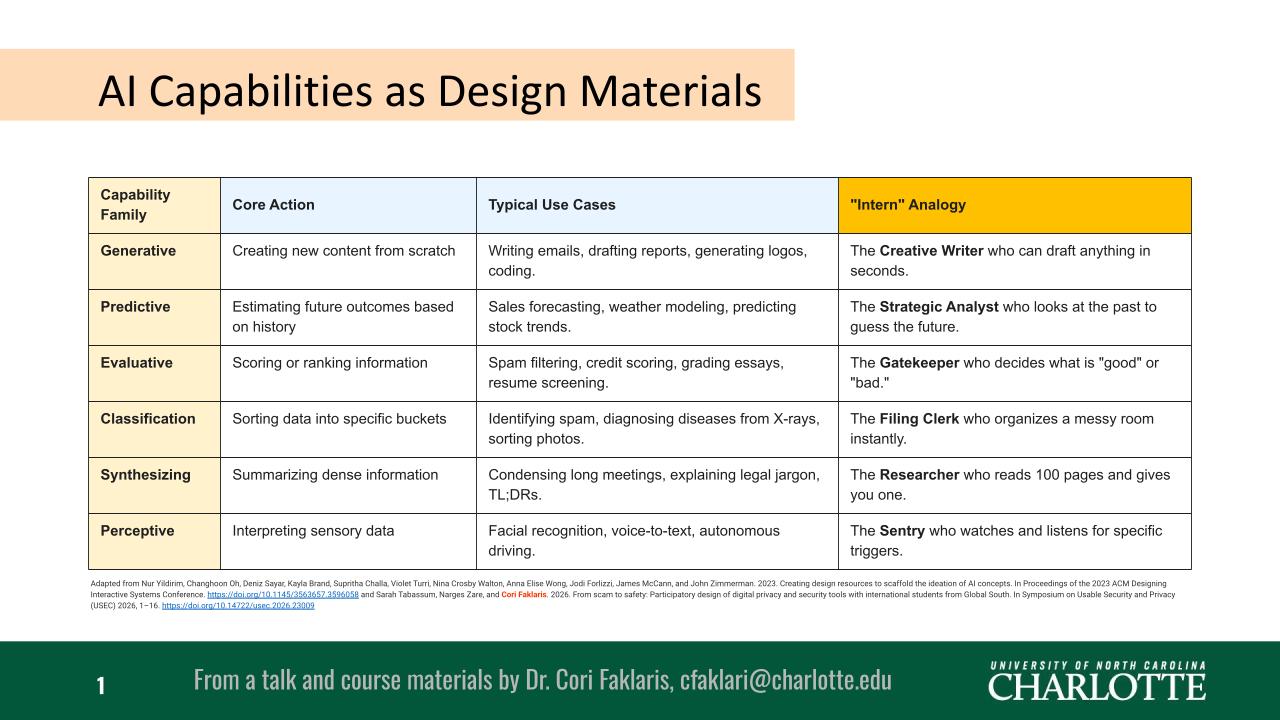
I decided that to make these capabilities approachable for teams, students, and stakeholders, each AI family should be conceptualized using an intuitive “Intern” analogy. (Framing AI as akin to a human intern grounds people’s mental models in familiar workplace roles, helping them to grasp how to delegate tasks while remembering that these machines still require clear direction, supervision, and human review.)
| Capability Family | Core Action | Typical Use Cases | “Intern” Analogy |
|---|---|---|---|
| Generative | Creating new content from scratch | Writing emails, drafting reports, generating logos, coding. | The Creative Writer who can draft anything in seconds. |
| Predictive | Estimating future outcomes based on history | Sales forecasting, weather modeling, predicting stock trends. | The Strategic Analyst who looks at the past to guess the future. |
| Evaluative | Scoring or ranking information | Spam filtering, credit scoring, grading essays, resume screening. | The Gatekeeper who decides what is “good” or “bad.” |
| Classification | Sorting data into specific buckets | Identifying spam, diagnosing diseases from X-rays, sorting photos. | The Filing Clerk who organizes a messy room instantly. |
| Synthesizing | Summarizing dense information | Condensing long meetings, explaining legal jargon, TL;DRs. | The Researcher who reads 100 pages and gives you one. |
| Perceptive | Interpreting sensory data | Facial recognition, voice-to-text, autonomous driving. | The Sentry who watches and listens for specific triggers. |
How to Use This in Workshops and Classes
I like to have this framework handy for ideation sessions and coursework. Simply asking “Where could we use AI?” often results in vague answers. Instead, I frame questions around these capabilities. Examples:
- Which part of our workflow needs a Researcher to synthesize information?
- Where do we need a Gatekeeper to evaluate or rank incoming data?
- Could a Creative Writer help kickstart draft content for our users?
By grounding AI concepts in relatable mental models, non-experts can move from feeling overwhelmed by AI to actively designing with it.
Overall Advice for Using AI
Before ending, I want to share the key takeaways that I always include in talks about AI for the non-expert:
Understand AI as a tool, not a brain: AI models do not possess true comprehension, intentionality, or lived experience — they are sophisticated pattern-matching systems. Viewing AI as a dynamic tool for language, visuals, and data rather than an independent thinker keeps expectations grounded. It excels at accelerating tasks and scaffolding creative ideation, but human context, ethical reasoning, and critical thinking must always drive the process.
Use AI as an “Infinite Intern” (Specify, Verify, Revise): I strive to leverage the speed of AI while treating its outputs with healthy skepticism. Like an eager intern with unlimited energy and no lived experience, AI works best when given clear, granular instructions (Specify). You must rigorously review its work for factual accuracy, hallucinations, and bias (Verify), and then refine the output through iterative feedback (Revise). Never delegate final accountability to the machine.
Prioritize human connection over automation: Automation should free up human energy for meaningful collaboration, not replace it. In course projects, team environments, and research labs, use AI to handle repetitive mechanical tasks or help break through blank-page paralysis. Preserve the core human elements (mentorship, empathy, nuanced communication, and shared problem-solving) that build real trust and insight.
Protect your and others’ sensitive personal data: Privacy and security must be foundational whenever you interact with digital tools. Avoid entering confidential research findings, student records, personal identifying information (PII), or proprietary data into public AI models. Assume that information entered into external prompts could be logged, stored, or used for model training, and ensure that your team’s workflows comply with data-protection principles.
Acknowledgements
Adapted from Nur Yildirim, Changhoon Oh, Deniz Sayar, Kayla Brand, Supritha Challa, Violet Turri, Nina Crosby Walton, Anna Elise Wong, Jodi Forlizzi, James McCann, and John Zimmerman. 2023. Creating design resources to scaffold the ideation of AI concepts. In Proceedings of the 2023 ACM Designing Interactive Systems Conference, https://doi.org/10.1145/3563657.3596058; and Sarah Tabassum, Narges Zare, and Cori Faklaris. 2026. From scam to safety: Participatory design of digital privacy and security tools with international students from Global South. In Symposium on Usable Security and Privacy (USEC) 2026, 1–16. https://doi.org/10.14722/usec.2026.23009
In my work, I use a data-protected version of Microsoft Copilot, and also a data-protected version of Gemini that includes several specially trained skills for my account, both of which are licensed by UNC Charlotte. These help me with some tasks, including writing outlines, proposing alternative wordings for sentences, troubleshooting HTML and other code, and crafting slides and other images. All ideas and the substantive content is my own work.